Since I look forward to seeing my friends and colleagues at the event I figured I would share my schedule for Autodesk University 2015! I look forward to collaborating and reconnecting with everyone, and meeting new connections as well! I'm pursuing the fabrication track again this year, and it will be nice to see the second year and how much further along we've progressed since last year! Please let me know if you would like to catch up and talk for a bit. I've added a new contact form on the blog for people to get quickly in contact with me, as well as for any Revit/Fabrication questions you may have!
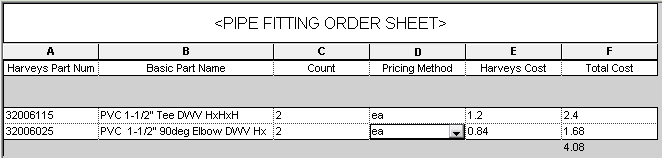
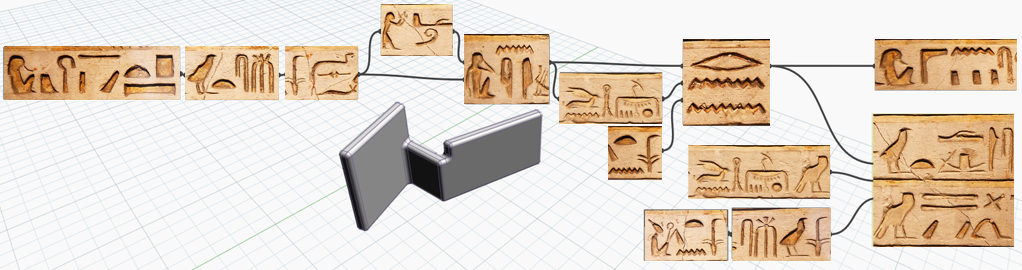
For some time now we have been coordinating our database of parts in Revit to match our database inventory in Sage 100 Contractor. Well today, I am proud to announce, we have figured it out! All with a simple Dynamo script. The process is simple! We tied a description to all of our parts from Sage to all of our Revit families. We then use Dynamo to use these "Key Families" to parameter map the descriptions of an excel spreadsheet to the prospective "Key Family" in the revit model. This allows us to pull the pricing data in at the end of each job, accurate pricing based on updated excel spreadsheets to our server, and in turn handing off accurate spool drawings with pricing to aid in our initial estimation and fabrication stage. Attached below is the current script and an example of the excel spreadsheet we are using to fuel this data to the parts! Enjoy!
Sage Database Parameter Mapping Part Numbers and Cost Module
Excel Spreadsheet of Data from Sage 100 Contractor
The Model Space Example
The Parameters that are overridden from the Dynamo definition.
Global parameters: Global parameters bring the power of parametric families into the project environment to better capture design intent. You can create global parameters that are specific to a single project file but that are not assigned to categories. Use global parameters to drive the value of a dimension or a constraint, associate to an element instance property to drive its value, or report the value of a dimension, so the value can be used in the equations of other global parameters.
Cancel print/export: When you print or export multiple views and sheets, click Cancel to cancel the entire operation. In earlier releases, the Cancel button allowed you to cancel only one view or sheet at a time. Now the Cancel button cancels the print jobs or export operations of all selected views and sheets.
Performance:
Occlusion culling: To improve performance and reduce the amount of time required to open views, the Graphics tab of the Options dialog offers a new setting: Draw visible elements only. This setting is enabled by default. Performance improvements are most noticeable for 3D views that contain many obscured elements.
Export to DWF/DWFx: To significantly reduce processing time when exporting views/sheets to multiple DWF or DWFx files, the software now uses several RevitWorker processes. This capability especially benefits users who want to upload their models to Autodesk® A360 for use with Collaboration for Revit or BIM 360 Glue.
Color fills: To improve performance, color fills are completed as a background process so you can continue working in the model while the views update.
Background processes: To see a list of the Revit processes that are running in the background, use the status bar.
Family Editor:
Family visibility preview: In the Family Editor, you can view improved representations of family geometry with respect to levels of detail, visibility parameter settings, and view type. Create, test and edit the geometry of a family without having to repeatedly load it into a project.
Filter voids and solids: You can specifically isolate void and solid geometry when using the Filter tool in the Family Editor.
Revisions: Additional information is available for revisions to make it easier to see exactly how the revision number will be generated, and to select revisions to include in a revision schedule.
Sheet Issues/Revisions dialog: When Numbering is set to Per Project, a new Revision Number column displays the actual revision number that will be generated based on the Sequence, Numbering scheme, and Numbering options. This column does not display if Numbering is set to Per Sheet.
Revisions on Sheet dialog: A Revision column now displays the revision sequence information along with the revision description. A new Date column displays the revision date.
Revitlinks: These changes improve workflow and productivity when using Revit links in the host model.
A new positioning option, Auto - Project Base Point to Project Base Point, is available when inserting Revit links. This option positions the linked file using the model's Project Base Point as the insertion point, and aligns it to the Project Base Point in the host model.
Two options are available to reposition a Revit link after it has been inserted: Reposition to Project Base Point, and Reposition to Internal Origin.
When you are working in a local copy of a workshared model, the Unload command offers 2 options:
Unload For all users: The Revit link is unloaded for all users in the model (existing behavior).
Unload For me: The Revit link is unloaded for the current user only. This command works like a permanent override and remains set for the current user for that RVT link until it is cleared. This option allows you to unload and keep Revit links unloaded for portions of the model you aren't working on without affecting other team members. Unloading Revit links may also increase performance and memory usage. To clear the override, right-click the link name in the Project Browser, and click Unload Clear my override.
Worksharing: When you are opening a workshared model and you select the Detach from Central option, the default name of the open model is now the original model name with "_detached" appended (instead of a blank file name). When saving the model, you can specify a name or use the default.
View range: The View Range dialog has been improved to provide visual descriptions of view range terminology, making it easier for you to set the view range.
Underlay: The Underlay properties have been improved to more clearly define what they do. A new grouping in the Properties palette, Underlay, contains the properties used to set an underlay range. The Underlay parameter is renamed to Range: Base Level. A new read-only parameter Range: Top Level displays the next level above the Range: Base Level. The options for Underlay Orientation are changed from Reflected Ceiling Plan to Look Up, and from Plan to Look Down.
Filters dialog: The Filters dialog has been improved to make it easier to find specific filters in the list. Filters are listed alphabetically and sorted in a tree structure with headings for rule-based and selection-based filters.
Perspective views: Additional modeling capabilities are now available in perspective views.
Modify panel (Copy)
Clipboard panelPaste drop-down (Paste from Clipboard), and any available tool from the drop-down
Spot slope: You can now place a spot slope annotation in a linked model.
Wall joins:
When placing walls, you can allow or disallow wall joins with the Join Status option.
You can select multiple wall joins and change the configuration of all selected joins to Butt, Miter, or Square Off.
Display of walls: To improve performance so that views open and update faster, Revit regenerates walls only for what is visible on the screen. In addition, if a wall appears very small on the screen, it is displayed as simplified lines, regardless of the detail level assigned to the view.
Railings: When you edit the Type properties of a railing, you can now use the Preview pane of the dialog to view your changes.
Autodesk Raytracer rendering: Define a custom render quality to specify light and material accuracy, and render duration options.
Energy Analysis:
Advanced thermal zoning: Revit now offers automatic thermal zoning that uses advanced algorithms, resulting in more accurate energy simulations without additional modeling.
On the ribbon, the Enable Energy Model tool has been renamed to Create Energy Model. Use this tool to create the energy analytical model and display it within the context of Revit. (When an energy model exists, the tool changes to Delete Energy Model.)
The accuracy and appearance of analytical surfaces has been improved. Edges are less pixilated, and surfaces are more accurate and less faceted. As a result, the energy analytical model is more accurate, looks better, and generates a smaller XML file.
Electrical settings: You can specify a default rating to use for creating circuits in a model.
Assigning a distribution system: If there is only one distribution system applicable to an equipment instance, the distribution system is now assigned automatically.
Display of ducts: To improve performance so that views open and update faster, Revit regenerates ductwork only for what is visible on the screen. In addition, if duct appears very small on the screen, it is displayed as simplified lines, regardless of the detail level assigned to the view.
For the past month or so I've been doing product updates and addin overviews of programs that have aided me throughout work and school. I know I've mentioned Unifi over and over and over again, and I will continue to, because until you've tried it you haven't lived. The following are V1.8's release notes pulled from Unifi's website. http://blog.discoverunifi.com/v1-8-release-notes/. The team has given Unifi a fantastic face lift, and it is even FASTER than before. Every release it gets faster and faster... hence every release has "Added several stability enhancements". These stability enhancements are no joke. Each stability enhancement has translated to $ in our pocket making that nineteen dollar a month price tag, per seat, pay for itself in increased efficiency in the office. For being in charge of our Revit content library this has made the time spent managing and updating content exponentially smaller. It used to be dreaded now it is complete joy to see our content library not only grow, but increase our productivity.
V1.8 RELEASE NOTESPOSTED IN NEWS, RELEASE NOTESWe are very happy to announce the release of Unifi v1.8. Highlighted in this release is the beginning of our graphic styling project including new colors, logo, and several UI/UX enhancements to make your experience using Unifi more enjoyable and streamline your efficiency!
A new Ideas portal is now live and open to all customers! Your ideas matter, login and start submitting your ideas directly to the Unifi team today. You can vote on other peoples ideas and let the Unifi team know what YOU want us to build next! To top it off a brand new Unfii website has been launched, check it out!
New Unifi Login Screen New Features:
New logos, color palette, and branding graphics have been updated across the Unifi application.
Admins can now edit the Library of a Content Request! (Thanks Fergus!)
Type Catalogs now display sorted exactly the same way as Revit does. Previously it was sorted per type name by default. (Thanks Ryan!)
New User Information button added to the top header bar of Unifi. This will show the currently logged in user and allow them to logout. More features will be added to this button very soon!
Dates displayed across the Unifi application have been set to the users local date/time format. (Localization of Data/Time)
Added several stability enhancements
Exterminated Bugs:
Fixed the Unifi installer to now show the current Unifi version in the Windows Add/Remove programs dialog. Previously it was stuck on v1.6..for some silly reason.
Fixed an issue where if a library was removed from an existing saved search the user or admin was never alerted of this. If this scenario happens Unifi will now display a human readable error message.
If a user was once part of a User group then removed, they would still have access to that User Groups permissions. We have fixed this so Unifi Admins across the world can now stop pulling their hair out.
Fixed an issue where in some cases newly uploaded content would not immediately be shown in searches and browsing.
Fixed an issue where some content requests where not showing up for Company Admins. This annoying behavior has been resolved.
Fixed an edge case of company saved searches not appearing once all libraries in a company were deleted. This would never happen in reality, but hey we fixed it anyway.
Fixed an issue where the sorting options for a saved search were not working. Whats the point of sorting if it doesn’t work?
We truly hope you enjoy this release. Thank you to all our great customers who share our vision of organizing, analyzing, and distributing the worlds BIM data!!The Unifi team is already working on the next release. We will not sleep, sleep is for the weak…and that is making us walk around the office like…the undead. Enjoy your Halloween!!
Cheers
SG
These enhancements continue to get better and better, and with this release it's clear that it will only continue becoming better and better thanks to the new customer request portal. Thanks to Parley, Steve, Brian and others at Inview Labs our requests have been listened to and enhanced time and time again!
The following video is how we've logged our plumbing group assemblies and utilized Unifi to enhance our productivity. This allows us to read a set of plans with labels, associated to each plumbing assembly and tied to our database, and allows us to place these assemblies in the prospective locations based on the Master Plumber's direction. You can only imagine how much time this saves compared to the normal route of having to insert a group that's in a list or inserting a group from a specified file location. Instead this hyperlinks our whole process all thanks to UNIFI!
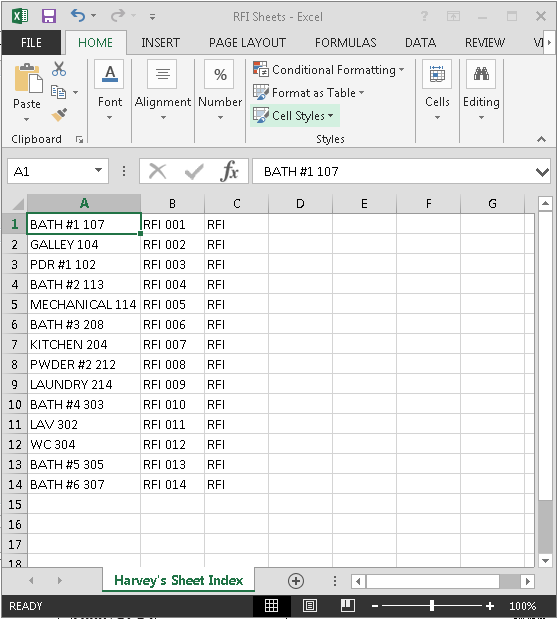
This tool allows us to type in the list of room names that contain plumbing fixtures that need to be specified through an RFI. Through a few simple nodes we're able to generate the sheets, first selecting the title block, and then group them based on their categories. All this data is fueled from the excel spreadsheet. In order for this node to work. You must first right click your sheets category, in the project browser, and set up a browser organization. Our's is called "Harvey's Sheet Organization". From there you can follow the steps below for success! I found an example of this online and cleaned it up a bit for our use in the office. I also modified the layout of the programming to work smoother.
Step One: Format your Excel Sheet (Drawing Name, Drawing Number, and Drawing Type)
Step Two: Specify your new "Drawing Type" Project Parameter
Step Three: Create a New Browser Organization
Step Three: Ignore Filtering and Specify Group and Sorting to "Drawing Type"
Step Four: Fueled by Excel File (Create the Module)
Final Result in Sheet Browser
RFI 001 - Bathroom #1 107 Example (Titleblock With Sheet Number and Name filled out.)
The initial example and process that I followed, and refined, can be found here:
Coordinated CAD Plan Set and 3D Underground Rough-In Model for prefabrication and placement in the field.
Cloud Storage of our Plumbing Assemblies
Bob Harvey Fabricating off of our internal Spool Sheets from Revit
Assemblies from Revit to Fabrication for Yellowstone Club Resort Homes.
Toilet and Sink Assembly
Floor Drain Assembly
Thanks to SysQue and Building Data we have been able to successfully integrate our plumbing designs to fabrication level of detail. So far we are using the spool sheets primarily for our underground rough-ins. We are currently developing our coordination with stud locations and wall locations to field verify and prefabricate our plumbing assemblies in the walls of these homes. This whole process has increased our efficiency in the field and design communication to the foreman and architects. This process has been an evolving process, but being able to coordinate with our foreman, estimation team, and contractors, this has been immensely rewarding. Our next obstacle is conquering our duct fabrication and implementation for fabrication. The tin shop is currently under construction and we will be rolling out Autodesk CAMduct in conjunction to running the sheet metal through our Revit Fabrication toolbar to fabricate in that shop with our plasma table. We are also investigating using our SysQue duct tool. This is the process that is under construction right now, and I look forward to sharing some examples of this shop when it's all up and running!
This tool was created to automate our crop region visibility. Instead of clicking through each view, checking and unchecking boxes, I decided to create a script that would automate this process, and it increased my productivity ten fold. May be a simple enough tool, but if you're new to Dynamo it might be nice to compare different things you can use Dynamo for to ease your sheet preparation or everyday office tasks. I intend to share these as I explore new things!
About a month ago I sat in on a "Coffee with Caleffi" webinar and had the pleasure of watching Jim Meseke, Director of BIM Content at ENGworks, give a presentation on "How to Utilize BIM in Hydronic System Design". The webinar was fantastic, as are the rest of the Coffee with Caleffi webinars, but this one stood out from the rest. It illustrates the importance of accurate building information content, and why it's important for this content to get into the hands of users who not only draw with Revit, but who order these products frequently. Jim Meseke explains how to draw utilizing their content in an approach that leverages the content for documentation and utilization in the future. At the time of the webinar Jim Meseke mentioned that the objects and cataloged through their platform "BIMXchange" that was only available for Revit 2012/2013/2014. After the webinar, due to many questions about the presentation and the relevance of where Revit is today and the accuracy of the calculations being utilized, Jim Meseke personally called me and explained to me his reasons for utilizing an older platform, and I explained why he needed to upgrade it. I mentioned to him how terrible this is for users, like myself, that stay up to date with the content and Revit platform and that it was only affecting their business and not promoting the "future" of BIM. After our conversation we realized how much we had in common in terms of being Revit advocates and spreading the word of how important building information content actually is and our roles and we ended on common ground of focusing on what the "future" may hold. I am pleased to announce that BIMXchange has been update for Revit 2016 and is now downloadable. This is HUGE! This means that users now have access to some free content, that was funded primarily by manufacturers for the users, and can now rely on accurate fittings that were drawn by industry professionals! Thank you Jim for listening to my rants throughout the webinar, and still providing this access to the community and showing us you truly care about the future of BIM and Revit!
ENGWorks also has a remarkable library of fittings that they made for Uponor Engineering. Here are the links for the content, and as for today, two great examples of companies in the MEP world of things that actually care that their customers have the right tools to design their systems accurately. I would also like to thank Mike Rivers at Uponor Engineering for caring enough about the future of Revit and it's role for designers today.
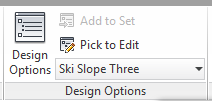
Setting up Design Options allow you to illustrate your process conceptually which is far more powerful being reinforced by DynamoBIM.
Ski Ramp Dynamo Script for Conceptual Massing
Upper Ski Ramp... Conceptual Scripting
Inserting my content from my content library managed through Unifi
Design Option #1
Design Option # 3
Design Option #2
I have been assigned a project for a hybrid building for downtown Bozeman, Montana, in my fourth year design studio at Montana State University. My program consists of several different categories. The program was developed through an automated excel spreadsheet that assigned us specific categories that were selected amongst the classmates for my fourth year design studio.
I was assigned the following through this random automatically assigned spreadsheet:
Ski Hill
Public Art
Animal Shelter
Data Center
Multi Family Housing
Party Headquarters
With the randomly assigned program I have developed my conceptual design through Revit; however, before obviously loading it into Revit I conceptualized these designs through a series of sketches. I focused on precedent studies following Lebbeus Woods and Constant Nieuwenhuys's manifesto "New Babylon". I also read the manifesto "Of Other Spaces" by Michel Foucault. These manifesto's led me to focus on the future of our society based on the principles applied in these manifestos. From there I sketched a series of how I saw the future of our society. A society that consists of Homo Ludens, people that are focused on fun and all the fun is fueled by a series of technology that is constantly evolving but stimulating the economy of these said Homo Ludens based on prior work. After a series of sketches I have arrived into inputting these series of Design Options into Revit. The beauty of Revit is that I am able to tie my data into Dynamo and fuel it into my iterative design. Here is where I am at now, and these iterations have been evolved through not only dynamo scripts but design options in Revit. This allows my designs to not be constrained by typical Revit geometry, but able to morph into the designs I have envisioned through these series of sketches. I will upload these sketches in the coming week, but for now here are the design options that have evolved through a series of evolving dynamo scripts and sketches.
Andy Milburn’s (and other’s) Flat Content. Downloadable through the links below.
As a follow up to the post a few months back about Revit training resources, and excellent places for learning new tips, I would like to add Håvard Vasshaug's blog to the list! I had the pleasure of going through some of his tutorials and witnessing the magic that he presents for learning Dynamo and exploring some of his other posts along the way.
Here are the links to his blog, the revit content he is kind enough to share, and a sample of one of his workshops he recorded and shared for online viewers:
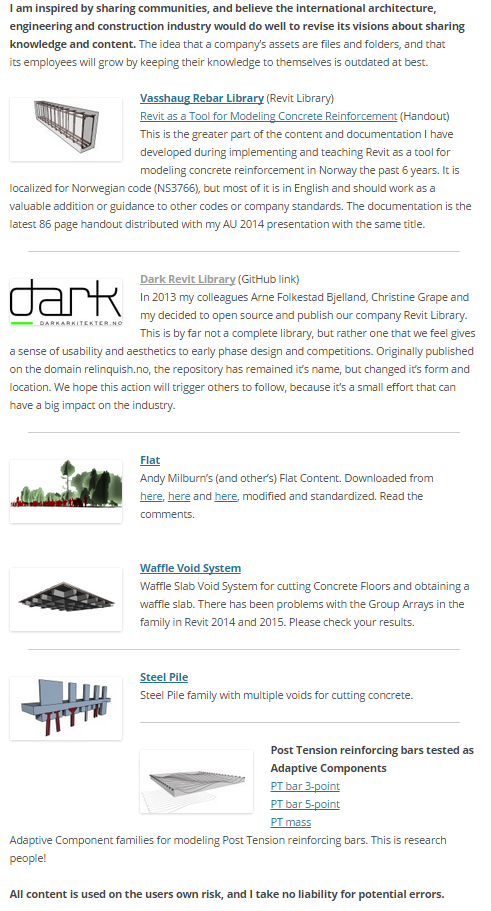
The following is from Håvard Vasshaug's blog. His reasons for sharing are a blessing to the Revit community, and also validate my reason for sharing! Thank you Håvard!! Your inspiration to share is an immense value to the Revit community!
The Revit Saver's aftermath of following Håvard Vasshaug's Tutorials
Now this is an absolutely crazy form, but the ability to connect adaptive components through the series of scripts, to array to a conceptual massing form, is incredibly powerful. I would highly suggest sitting down for an hour or so and following along to his videos. It helps users become much more comfortable with the foreign looking interface of Dynamo for people that have never visually programmed before.
Luke Johnson's explanation of what scripts look like to users that have never visually programmed before! o.0