I happened to be scrolling through the dynamo package manager and stumbled upon Timothy Logan's Elk Package for Dynamo. I've had some familiarity with Elk in the past with Grasshopper and in prior years of architecture school, and it's great package for integrating all your OSM and Topography data into Dynamo. Go download it on the package manager and give Timothy Logan some thanks for an excellent share! Truly another great example of how powerful the Dynamo community is!
Elk 1.0.0
Thank you to Timothy Logan for making Elk available to Dynamo users!
Here are his two videos for how to use the OSM data and Topographical data.
Elk for Dynamo - OSM from Timothy Logan on Vimeo.
Elk for Dynamo - Topography from Timothy Logan on Vimeo.
Some of the links referenced in the above videos:
https://www.openstreetmap.org/
http://dds.cr.usgs.gov/srtm/version2_1/
http://earthexplorer.usgs.gov/
http://www.opentopography.org/
Friday, November 20, 2015
Thursday, November 19, 2015
Autodesk University 2015: Business Card Management for Dummies!
You will need a Microsoft 365 Account. As a student I have a free account, and am able to utilize this service; however, this option will not be available if you don't already subscribe. There are other applications through the web you can search for to manage this, but this process seems to work best for me! I can still bring the cards back and put them in my drawer, but the benefit to this process is that the contacts will be stored as soon as I capture the card and download the .vcf on my desktop!
| 1. Download Microsoft Lens |
| 2. Take a picture of your business card. |
| 3.) Automatically adjusts to fit the card to the screen. |
| 4.) Choose your OneNote (Contact + Image) option. |
| 5.) Name the person's card. |
| 6.) List of contacts for easy access in the future. If you click the organization button next to the edit button it will display an image of the business cards as well. |
7.) The interface appearance on One Notes Website
|
| 9.) Open this file |
| 10.) All the cards information is autofilled, and there is no typing necessary. The process literally takes seconds per card! |
Wednesday, November 4, 2015
Dynamo - RFI Sheet Generator Module Update
Previously I hadn't found the solution for being able to select all of the callout views in a particular file. Well thanks to JimmyG on the DynamoBIM community forums for sharing this image with me.
I was able to filter out the initial manual entry mode that I had, and replaced it with this bit to get it to work flawlessly. Now I can simply click run once I've completed the original series of steps and it will generate my RFI Sheets for me. Here's the color coded, new and improved, RFI Sheet Generator Module all thanks to the DynamoBIM Community!
The Run Results:
| The Spreadsheet |
| Views added to Sheets and Named Accordingly. |
The original conversation and posts on the DynamoBIM Community Forms can be viewed here:
Sunday, November 1, 2015
Autodesk 360 Rendering Pro of the Week Article - January 2015
01/08/2015
Rendering Pro of the Week- Brian Nickel
At his workplace—Harvey’s Heating & Plumbing Company in Bozeman, Montana—the staff is currently integrating Revit into their office by incorporating their inventory database with Revit. “We use the software for piping diagrams, and are looking into cost estimation in the near future,” he says.
After he started utilizing the cloud rendering feature about a year ago, he found that his workflow and efficiency had increased dramatically. “I am always sending my renderings to the cloud to explore new ways of getting a better result. I learned that students receive the whole service for free, and for the past year I have been using the cloud as much as I can to not only refine my renderings, but to explore better ways of accomplishing results,” he says.
His featured rendering, the “Seattle Hydrology Institute”, was a project for Nickel’s third year of architecture school. The purpose was to find a solution to reconnect the people of Seattle to the waterfront after the Alaskan Way Viaduct is removed.
“I faced lighting and orientation challenges, but through my renderings, I was able to discover answers to these problems and further develop my design,” says Nickel.
For the materials, Nickel was impressed with the number of realistic textures that Revit provided. “Revit actually has really nice preloaded materials that you can set to your systems that look really good. After picking the ones that I thought would work well together, I was able to generate a rendering that achieved the look I was going for. This process allows me to visualize material choices very quickly and efficiently.”
It was also very important to Nickel to have a photorealistic image to share with his professors so that they could visualize his design objectives. Presenting the renderings led to more comments and feedback to his design, which helped improve his designs and processes going forward.
“Cloud rendering also gave me piece of mind knowing that as my design is progressing, my renderings are being generated as a time-lapse of the design process. Cloud rendering gives me the opportunity to focus on my design with an extensive set of tools at my disposal,” Nickel says.
It’s also given him skills like distinguishing a good rendering from a bad rendering, which makes him helpful to his fellow colleagues. “My professors remain continually impressed with my work. Cloud rendering allows me to design with additional quality and less worry—it’s really helped make my life easier as a designer and student educator."
The article's link on the Autodesk 360 Rendering website.
I wanted to share this article for anyone else that uses Autodesk's cloud rendering service. It's important to understand the power of rendering in the cloud, and how beneficial it could be for one in professional practice! It has helped me numerous times as a student!
Friday, October 30, 2015
Dynamo - Space Planning DynamoBIM Community Collaboration
Thanks to Kyle C. Martin for initially sharing his post on the DynamoBIM blog about Space Planning and using Dynamo for task automation, and collaborating with me about his process! I have successfully laid out a similar script that allows myself to input programmatic data into my excel spreadsheet. I followed through his process and made some refinements on my end to simplify some his programming with other modules that might perform the same way. When all was said and done, and after a weekend of wading through some examples and thoughts about how it all should go together, I had some success re-engineering this fantastic module! This is going to help me illustrate the data of my program to the faculty at my school, and better illustrate some design intent. I am very grateful for the Dynamo Community, and for having professionals in the industry that are willing to take time out of their busy lifestyles to collaborate and bounce ideas off of!
You can read more about Kyle C. Martin and some of his workflows here:
http://www.martinportfolio.com/blog/
Kyle was kind enough to make me work through the process on my own, and shared tips, hints and tricks along the way. Definitely worth exploring some of his thoughts and how he uses DynamoBIM in his professional workflows. It is important to note that Kyle did not share the Dynamo Module with me, and allowed me to figure it out on my own through trial and error and professional feedback. Thank you again Kyle for challenging me!
The Dynamo Primer is now open-source and is more informative than ever. This is what has helped me learn how to use Dynamo in our office at Harvey's Plumbing and Heating in Bozeman, Montana.
Check out the Dynamo Primer here!:
http://dynamoprimer.com/
Check out the Dynamo Community forums here:
http://dynamobim.com/forums/forum/dyn/
I would also like to thank Julien Benoit for helping us out with the assembly creation modules we've made here in the office! It is important to understand that the Dynamo Community has a plethora of people that are there to help with any problems you may be having with your Dynamo learning endeavors and that people are there more than willing to help you learn and to learn together!
The Revit Saver's Screencast Group Update
New Contact Form for invites to the The Revit Saver's Screencast group!
| Please provide your email address in the message, a question to a problem you may be having, and I will send you a group invite and answer your questions! |
For anyone interested in asking questions and learning more about Revit functionality, I have opened up a screencast group for therevitsaver.blogspot.com. You are more than welcome to send me a message through the blog form, on the right hand side of the site, for an invite. The beauty is that I will be able to answer any burning questions that you can't get answered, or be able to point you in the right direction for something that might be a little bit more helpful! Chances are if you're asking a question... someone else has already asked the same one! I look forward to seeing you all on therevitsaver's screencast group page!
Autodesk Screencast
The Revit Saver's Autodesk University 2015 Schedule
Since I look forward to seeing my friends and colleagues at the event I figured I would share my schedule for Autodesk University 2015! I look forward to collaborating and reconnecting with everyone, and meeting new connections as well! I'm pursuing the fabrication track again this year, and it will be nice to see the second year and how much further along we've progressed since last year! Please let me know if you would like to catch up and talk for a bit. I've added a new contact form on the blog for people to get quickly in contact with me, as well as for any Revit/Fabrication questions you may have!
Thursday, October 29, 2015
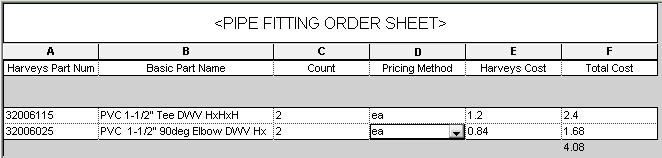
Dynamo - Sage Database Excel Parameter Mapping Part Numbers and Cost Module
| Excel Spreadsheet of Data from Sage 100 Contractor |
| The Model Space Example |
| The Parameters that are overridden from the Dynamo definition. |
| Ordering Schedule for Hand off to Shop Manager |
Thursday, October 22, 2015
Revit 2016 R2 (Sunrise) 10-22-2015 Released!
Sunday, October 18, 2015
The Revit Saver's October 2015 Add-in Update Review for Unifi v1.8!
For the past month or so I've been doing product updates and addin overviews of programs that have aided me throughout work and school. I know I've mentioned Unifi over and over and over again, and I will continue to, because until you've tried it you haven't lived. The following are V1.8's release notes pulled from Unifi's website. http://blog.discoverunifi.com/v1-8-release-notes/. The team has given Unifi a fantastic face lift, and it is even FASTER than before. Every release it gets faster and faster... hence every release has "Added several stability enhancements". These stability enhancements are no joke. Each stability enhancement has translated to $ in our pocket making that nineteen dollar a month price tag, per seat, pay for itself in increased efficiency in the office. For being in charge of our Revit content library this has made the time spent managing and updating content exponentially smaller. It used to be dreaded now it is complete joy to see our content library not only grow, but increase our productivity.
These enhancements continue to get better and better, and with this release it's clear that it will only continue becoming better and better thanks to the new customer request portal. Thanks to Parley, Steve, Brian and others at Inview Labs our requests have been listened to and enhanced time and time again!
The following video is how we've logged our plumbing group assemblies and utilized Unifi to enhance our productivity. This allows us to read a set of plans with labels, associated to each plumbing assembly and tied to our database, and allows us to place these assemblies in the prospective locations based on the Master Plumber's direction. You can only imagine how much time this saves compared to the normal route of having to insert a group that's in a list or inserting a group from a specified file location. Instead this hyperlinks our whole process all thanks to UNIFI!
Sign up here today for Unifi!
V1.8 RELEASE NOTESPOSTED IN NEWS, RELEASE NOTESWe are very happy to announce the release of Unifi v1.8. Highlighted in this release is the beginning of our graphic styling project including new colors, logo, and several UI/UX enhancements to make your experience using Unifi more enjoyable and streamline your efficiency!
A new Ideas portal is now live and open to all customers! Your ideas matter, login and start submitting your ideas directly to the Unifi team today. You can vote on other peoples ideas and let the Unifi team know what YOU want us to build next! To top it off a brand new Unfii website has been launched, check it out!
New Unifi Login Screen
New Features:
- New logos, color palette, and branding graphics have been updated across the Unifi application.
- New Unifi Ideas Portal has been launched! Start submitting your ideas today – https://unifi.ideas.aha.io
- New DiscoverUnifi website is up and live, check it out here–> https://www.discoverunifi.com
- Admins can now edit the Library of a Content Request! (Thanks Fergus!)
- Type Catalogs now display sorted exactly the same way as Revit does. Previously it was sorted per type name by default. (Thanks Ryan!)
- New User Information button added to the top header bar of Unifi. This will show the currently logged in user and allow them to logout. More features will be added to this button very soon!
- Dates displayed across the Unifi application have been set to the users local date/time format. (Localization of Data/Time)
Exterminated Bugs:
- Added several stability enhancements
- Fixed the Unifi installer to now show the current Unifi version in the Windows Add/Remove programs dialog. Previously it was stuck on v1.6..for some silly reason.
- Fixed an issue where if a library was removed from an existing saved search the user or admin was never alerted of this. If this scenario happens Unifi will now display a human readable error message.
- If a user was once part of a User group then removed, they would still have access to that User Groups permissions. We have fixed this so Unifi Admins across the world can now stop pulling their hair out.
- Fixed an issue where in some cases newly uploaded content would not immediately be shown in searches and browsing.
- Fixed an issue where some content requests where not showing up for Company Admins. This annoying behavior has been resolved.
- Fixed an edge case of company saved searches not appearing once all libraries in a company were deleted. This would never happen in reality, but hey we fixed it anyway.
- Fixed an issue where the sorting options for a saved search were not working. Whats the point of sorting if it doesn’t work?
We truly hope you enjoy this release. Thank you to all our great customers who share our vision of organizing, analyzing, and distributing the worlds BIM data!!The Unifi team is already working on the next release. We will not sleep, sleep is for the weak…and that is making us walk around the office like…the undead.
Enjoy your Halloween!!
Cheers
SG
These enhancements continue to get better and better, and with this release it's clear that it will only continue becoming better and better thanks to the new customer request portal. Thanks to Parley, Steve, Brian and others at Inview Labs our requests have been listened to and enhanced time and time again!
The following video is how we've logged our plumbing group assemblies and utilized Unifi to enhance our productivity. This allows us to read a set of plans with labels, associated to each plumbing assembly and tied to our database, and allows us to place these assemblies in the prospective locations based on the Master Plumber's direction. You can only imagine how much time this saves compared to the normal route of having to insert a group that's in a list or inserting a group from a specified file location. Instead this hyperlinks our whole process all thanks to UNIFI!
Sign up here today for Unifi!
Subscribe to:
Posts (Atom)